
Architecture Overview
The system, end to end
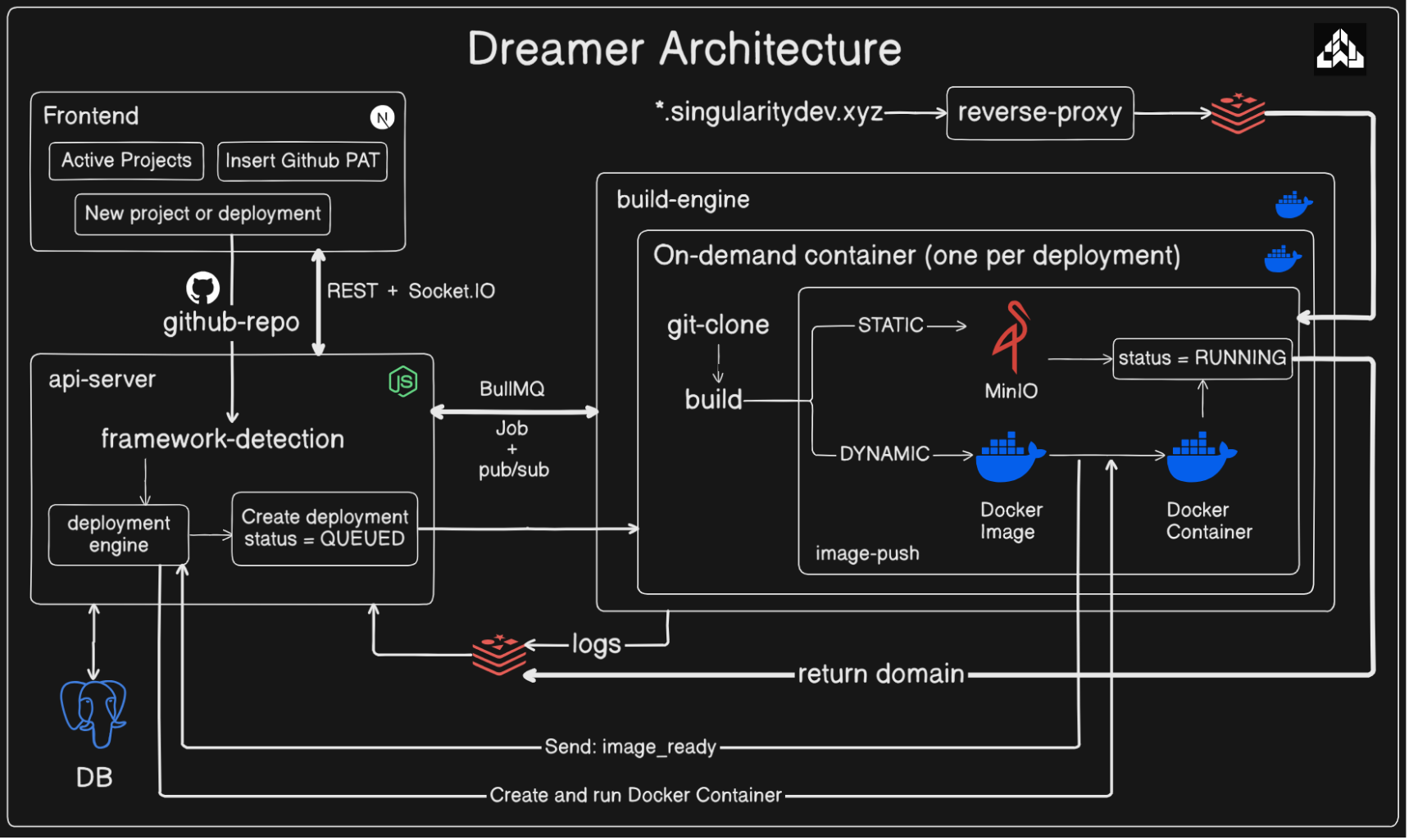
Nine containers, all on one box. Three of them (frontend, api-server,
build-worker) are the control plane — the dashboard you interact with.
One (build-engine) is ephemeral compute that only exists for the
duration of a single build. One (reverse-proxy, behind nginx) is the
always-on ingress every deployed app's traffic passes through. The last
"service" isn't a service at all — it's whatever your own project becomes
once deployed: either files in MinIO or a Docker container, both served
without ever touching the control plane.
The network posture is deliberately asymmetric:
| Surface | Exposure | Why |
|---|---|---|
Dashboard (frontend + api-server) | loopback only (127.0.0.1:3000, 127.0.0.1:8000) | This is where deployments get created/deleted and credentials live. No public hostname routes here at all — reached via SSH tunnel or VPN. |
| Deployed apps + custom domains | public, via *.yourdomain.com and verified custom domains | The actual product surface — supposed to be reachable by anyone, same as any deployed website. |
Webhook receiver (/api/webhooks/github) | public, but only that one path — opt-in via ENABLE_PUSH_DEPLOY=true | The only reason the API would ever need a public hostname: GitHub delivering push events. Off by default. |
See auth/README.md for how this maps onto the auth
model.
Why builds run in throwaway containers
Building an arbitrary repo means running npm install and npm run build
for code you didn't write, with a package.json you don't control,
potentially with a malicious postinstall script. That's not something to
run inside api-server's own process — a compromised build should not have
access to its database credentials, its Redis connection, or anything else
on the box.
So each build gets its own container: build-worker dequeues a job from a
BullMQ queue in Redis and issues a plain docker run (via the host daemon)
launching the build-engine image as dreamer-build-{deploymentId} — its
own isolated filesystem, everything it needs passed in as environment
variables, exits the moment the build finishes. Nothing long-running shares
a process with untrusted code.
See deployments/overview.md for exactly
what build-engine does once it's running.
Why Postgres, Redis, and MinIO are used for different things
- Postgres is the durable source of truth — every
Project,Deployment,User,UserSession, andDeploymentLogrow lives here. Anything that needs to survive a restart, or that another part of the system needs to query later, goes here. - Redis is used for three things that are NOT durable state:
- The build queue — BullMQ jobs sitting in Redis are what
build-workerdequeues; this decouples "user clicked Deploy" from "a build actually starts," and gives you retries for free. - Pub/sub —
build-enginepublishes log lines and status updates to a channel nameddeployment:{deploymentId};api-serversubscribes and relays them to connected dashboard clients over Socket.IO, AND persists them to Postgres as it goes (seerealtime/log-relay.ts). Redis here is a message bus, not storage — if no one's subscribed when a message publishes, it's gone; the Postgres write is what actually makes the log durable. - A 30-second cache in
reverse-proxy, in front of the Postgres query that resolves a hostname to a deployment (seereverse-proxy/README.md) — every single request to every deployed app would otherwise cost a Postgres round trip before it could even start proxying.
- The build queue — BullMQ jobs sitting in Redis are what
- MinIO holds static deployment output under
__outputs/{project-slug}/. Serving files out of an object store means "serving a deployed app" never touchesapi-server's compute at all — a spike in traffic to one deployed app can't degrade the dashboard.
The full lifecycle of one deployment
This is the thread that ties every other doc together. Follow a single deployment from click to live URL:
- You click "Deploy" in the dashboard (or hit
POST /api/deployments).api-server'sdeployment.service.tscreates aDeploymentrow with statusQUEUED, resolves the project's configured env vars into a snapshot, and enqueues a BullMQ job. build-workerdequeues the job, decrypts the stored git token if the repo is private (it must never sit in the persisted queue payload), and callsdeploymentEngine.launchBuildTask()— onedocker run, running thebuild-engineimage with everything the task needs (repo URL, branch, install/build commands,DEPLOYMENT_TYPE,FRAMEWORK, env vars) as container overrides. TheDeploymentrow transitions toBUILDING.- Inside the container,
build-engine'sscript.jsclones the repo, checks out the right commit, and branches onDEPLOYMENT_TYPE:- STATIC: install → build → verify the output directory exists →
upload every file to MinIO under
__outputs/{project-slug}/. - DYNAMIC: resolve a Dockerfile (the repo's own, or a generated
one) → build it locally against the host daemon → tag it
dreamer-app:{project-slug}. Every log line and status change is published to Redis as it happens.
- STATIC: install → build → verify the output directory exists →
upload every file to MinIO under
api-server'slog-relay.tsis subscribed to that Redis channel the whole time — it persists each log line to Postgres and relays it over Socket.IO to anyone with the deployment's detail page open, live.- STATIC finishes here — the last thing
build-enginepublishes is aRUNNINGstatus with the deployment's public URL, andProject.activeDeploymentIdis updated to point at it. DYNAMIC has one more hop:build-engine's job ends at "image built" — it publishes animage_readyevent instead. That event triggershandleImageReady()back inapi-server, which starts the image as a staging container, waits for it to pass an HTTP health check, then swaps it in asdreamer-app-{project-slug}(seedeployments/dynamic-deployments.md) — this happens inapi-server, notbuild-engine, deliberately: the build container's job is producing an artifact, nothing more. Once the swap completes,api-servertransitions the deployment toRUNNING. - A visitor hits
https://{project-slug}.yourdomain.com.nginxterminates TLS for the wildcard domain and forwards — originalHostheader preserved — toreverse-proxy, which looks up that hostname (Postgres, cached), finds the project'sactiveDeploymentId, checks itstype, and proxies accordingly — straight to the MinIO path for STATIC, or to the deployment's app container for DYNAMIC.
Every step above is covered in far more depth in its own doc — this page is the map, not the territory.
The state machine
Deployment.status isn't a free-form string — a Postgres trigger
(check_deployment_status_transition, in the schema's migrations)
enforces which transitions are even possible at the database level, not
just in application code. The full set:
QUEUED → BUILDING → UPLOADING* → RUNNING
                   ↘ STARTING†  ↗
                   ↘ FAILED
         (any of the above) → STOPPED
* UPLOADING is STATIC-only (the object-store upload phase).
† STARTING is DYNAMIC-only — covers the window between "image built"
and "container swapped in and confirmed healthy."
This matters beyond bookkeeping: it's what makes stopDeployment() safe
to call from any state without special-casing every possible current
status in application code — an invalid transition simply gets rejected
by Postgres itself.